
n8n Cloud vs Self-Hosted: Which Should You Choose In 2026?
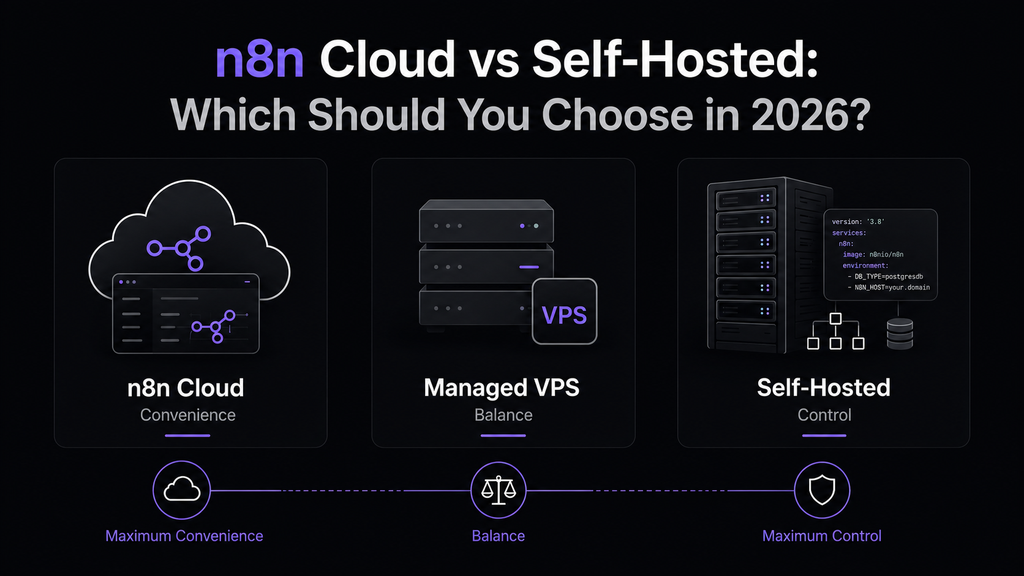
Choosing how to run n8n is one of the first important decisions you’ll make once you start using the platform seriously.
If you’re still learning the basics of n8n, start with What Is n8n? Complete Beginner’s Guide before deciding how you want to host it.
You can use n8n Cloud, where n8n manages the infrastructure for you, or you can self-host n8n on your own machine, a VPS, or another server and take control of the entire environment.
There is also a third option that sits somewhere between the two: a managed VPS with n8n pre-installed, such as Hostinger’s n8n hosting. You still get a self-hosted n8n instance and the flexibility of a VPS, but the initial setup is much simpler.
So which option is actually better?
The answer depends on how much infrastructure you want to manage, how much control you need, your technical experience, your expected workload, and how much your time is worth.
Quick answer: Choose n8n Cloud if you want the easiest experience and don’t want to maintain a server. Choose self-hosted n8n if you want maximum control, customization, and the ability to manage your own infrastructure. Choose a managed n8n VPS such as Hostinger if you want self-hosted n8n without doing the entire installation yourself.
This guide compares all three approaches in detail so you can choose the right one for your situation.
n8n Cloud vs Self-Hosted at a Glance
Before going into the details, here is the simplest way to compare the three options:
| n8n Cloud | Managed n8n VPS | Fully Self-Hosted | |
|---|---|---|---|
| Setup difficulty | Very low | Low | Medium to high |
| Server management | n8n | Mostly you and the VPS provider | You |
| Infrastructure control | Low | High | Very high |
| n8n installation | Already managed | Pre-installed | You install it |
| Docker knowledge | Not required | Usually not required initially | Recommended |
| Linux knowledge | Not required | Helpful | Recommended |
| Maintenance | Very low | Medium | High |
| Customization | Limited compared with self-hosting | High | Very high |
| VPS required | No | Yes | Yes, unless using your own hardware |
| Scalability control | Managed | High | Very high |
| Best for beginners | Yes | Yes | Not always |
| Best for infrastructure enthusiasts | Less suitable | Good | Excellent |
| Best for advanced deployments | Depends on requirements | Good | Excellent |
The important thing is that none of these choices is universally better.
They simply optimize for different priorities.
What Is n8n Cloud?
n8n Cloud is the hosted version of n8n.
Instead of installing n8n on a server yourself, you sign up, access your workspace through your browser, and start building workflows.
You don’t need to:
- Rent a VPS
- Install Docker
- Configure a reverse proxy
- Set up HTTPS yourself
- Manage the operating system
- Configure PostgreSQL manually
- Manage Redis
- Monitor the server
- Apply n8n updates yourself
That is the biggest advantage of n8n Cloud.
It turns n8n into a service you can simply use rather than a piece of infrastructure you have to operate.
Who is n8n Cloud for?
n8n Cloud is particularly attractive if you:
- Are new to n8n
- Want to start automating quickly
- Don’t want to learn Linux or Docker
- Don’t want to maintain servers
- Are building automations for a business without dedicated IT staff
- Prefer predictable operational responsibilities
- Want to spend your time building workflows rather than maintaining infrastructure
You can access n8n Cloud here:
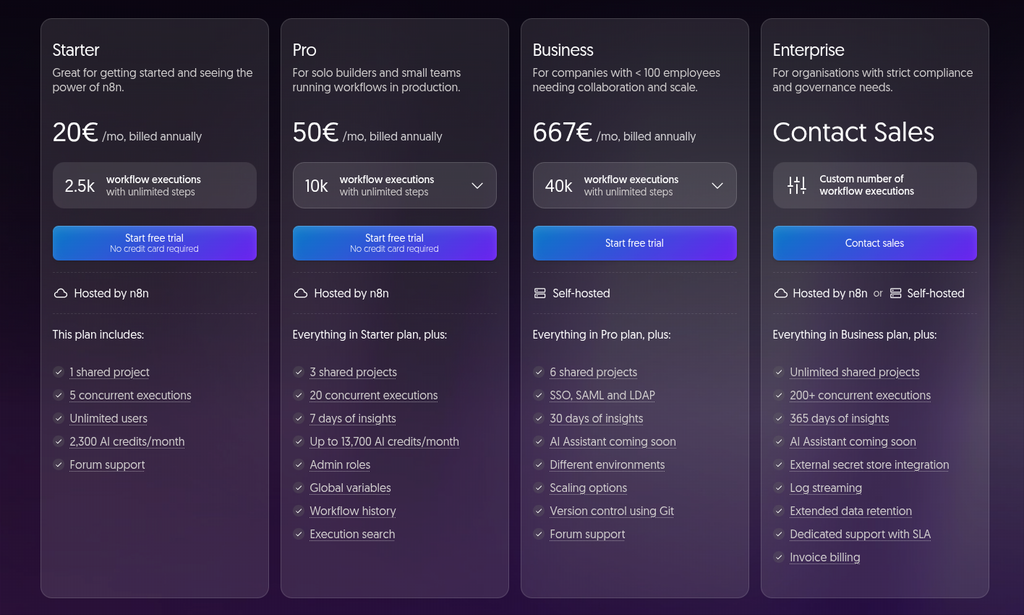
The current n8n Cloud plans are based on workflow executions rather than charging separately for every step in a workflow. n8n currently lists Starter at €20/month when billed annually, with 2,500 workflow executions per month, and Pro starting at €50/month when billed annually, with 10,000 executions. Exact plans, limits and pricing can change, so check the official pricing page before making a purchasing decision. n8n pricing
For many users, the simplicity is worth paying for.
What Is Self-Hosted n8n?
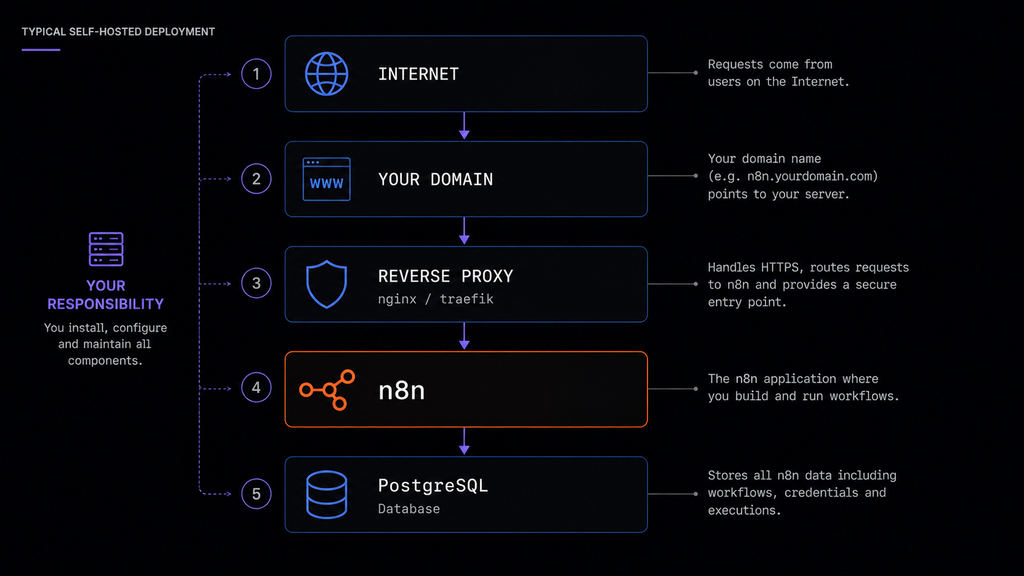
Self-hosting means that you run n8n yourself instead of having n8n operate the application infrastructure for you.
That could mean running n8n on:
- Your own computer
- A home server
- A Raspberry Pi
- A VPS
- A dedicated server
- A cloud virtual machine
- Your company’s infrastructure
A simple self-hosted installation might run n8n on a VPS behind a domain and a reverse proxy. A more advanced deployment could use PostgreSQL as the database and add Redis with separate workers when the workload requires it.
The main difference between Cloud and self-hosting is straightforward:
you control the architecture.
That is powerful, but it also means you are responsible for operating it correctly.
There Is a Third Option: Managed n8n VPS Hosting
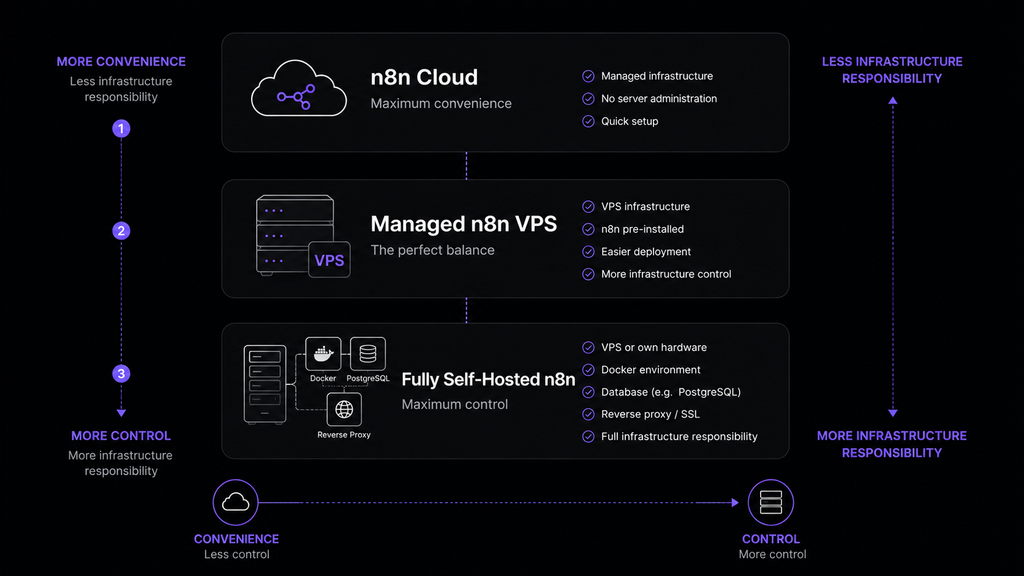
Not everyone wants to choose between:
“I don’t want to manage a server”
and
“I want to manage everything myself.”
There is a middle ground.
A service such as Hostinger’s n8n VPS hosting gives you a VPS with n8n available through a much simpler deployment process. Hostinger currently offers n8n as a pre-installed application through its VPS offering, including a one-click deployment option. Its current plans include VPS resources such as 1 vCPU/4 GB RAM on KVM 1, 2 vCPU/8 GB RAM on KVM 2, and larger options for higher workloads. Current promotional and renewal prices can change, so check Hostinger’s official page for the latest details.
Check Hostinger’s n8n VPS hosting
You still have a server and a self-hosted application, but you don’t necessarily have to start from a completely empty VPS.
Hostinger also currently advertises features such as one-click n8n deployment, automatic weekly backups on its VPS offering, and VPS management tools. Its support covers the VPS environment, while n8n workflow configuration remains your responsibility.
That makes this option particularly interesting for users who are comfortable enough to want self-hosting but don’t want to spend their first afternoon configuring a server.
How Much Does n8n Cloud Cost?
One of the most common reasons people compare Cloud and self-hosting is price.
However, comparing:
“n8n Cloud costs X”
with:
“a VPS costs Y”
is incomplete.
You need to consider total cost of ownership.
n8n Cloud
With Cloud, your main cost is the subscription.
You are effectively paying n8n to provide a managed environment.
That means you don’t normally need to separately budget for:
- A VPS
- Server maintenance
- Operating system administration
- Database administration
- Reverse proxy configuration
- HTTPS infrastructure
- Server monitoring
The current n8n pricing page lists:
- Starter: €20/month when billed annually, with 2,500 workflow executions
- Pro: €50/month when billed annually, with 10,000 executions
- Higher tiers for larger teams and workloads
n8n’s pricing is based on monthly workflow executions rather than the number of individual steps inside each workflow. Always check the current pricing page because plans and limits can change over time.
How Much Does Self-Hosted n8n Cost?
Self-hosted n8n can be considerably cheaper at small scales, but the total cost is more complicated than the VPS invoice.
Your actual cost can include:
- VPS
- Backups
- Domain
- Monitoring
- Storage
- Additional infrastructure
- Your time
You might start with a small VPS and spend only a few euros per month on infrastructure.
But as your requirements grow, you may eventually need:
- More CPU
- More RAM
- Larger storage
- External backups
- Redis
- PostgreSQL
- Multiple workers
- Monitoring
- Additional infrastructure
And there is another cost that is easy to ignore:
your time.
If you spend three hours troubleshooting a server instead of working on your business, that time has a cost too.
This is why self-hosting isn’t automatically “cheaper.”
It is often more cost-efficient for users who are comfortable managing infrastructure, but that doesn’t mean it is the best financial decision for everyone.
Is Self-Hosted n8n Free?
This question needs an important distinction.
There is a difference between:
free software
and
free infrastructure.
You can run n8n yourself, but the machine running it still has to exist somewhere.
That might be:
- Your own computer
- Your home server
- A Raspberry Pi
- An existing server
- A free cloud tier
- A paid VPS
So self-hosting can sometimes be run at almost no additional infrastructure cost, particularly if you already own suitable hardware or use a qualifying free cloud resource.
However, free infrastructure always comes with provider-specific limits and terms.
For example, one future guide on this site will cover how to run n8n using Oracle Cloud’s Free Tier, which can potentially allow you to run a self-hosted instance without paying for a conventional VPS, subject to Oracle’s current availability, resource limits and terms.
[Coming soon: How to Self-Host n8n for Free with Oracle Cloud Free Tier]
The key takeaway is:
Don’t choose self-hosting because somebody told you it is “free.” Choose it because the level of control and responsibility makes sense for you.
Which Option Is Easier?
This is where n8n Cloud wins decisively.
n8n Cloud
With Cloud, you create an account, open your workspace, and start building workflows.
You can start without first learning:
- Linux
- Docker
- DNS
- Reverse proxies
- TLS certificates
- PostgreSQL administration
That is incredibly valuable.
If your goal is:
“I want to automate my business.”
you might not want the additional project of:
“I also want to become my own infrastructure administrator.”
And there is absolutely nothing wrong with that.
What Does Self-Hosting Actually Involve?
A typical self-hosted deployment can involve:
- Choosing hardware or a VPS
- Installing and securing the operating system
- Installing Docker
- Deploying n8n
- Configuring a domain
- Setting up HTTPS
- Configuring authentication
- Choosing and configuring a database
- Setting up backups
- Monitoring the server
- Updating n8n
None of these steps are impossible.
But together, they form another technical system that you have to maintain.
This is why I generally recommend that beginners start with n8n Cloud unless they specifically want to learn self-hosting.
How Much Technical Knowledge Do You Need?
Beginner
Choose n8n Cloud.
You can focus entirely on workflows and automation.
Comfortable with Docker and Linux
Self-hosting becomes much more attractive.
You can deploy n8n on a VPS and manage the environment yourself.
Advanced technical user
Fully self-hosted n8n can become extremely powerful.
You can build architectures around:
- PostgreSQL
- Redis
- Workers
- Queue mode
- Reverse proxies
- Monitoring
- Backups
- Custom networking
- Multiple services
The important distinction is this:
Installing n8n is relatively easy. Operating n8n reliably in production is a different problem.
Which Option Gives You More Control?
There is no real contest here.
n8n Cloud
You use an environment managed for you.
That is a feature, not a weakness.
You don’t have to worry about the underlying infrastructure because that responsibility is largely abstracted away.
Self-hosted
You decide:
- Where n8n runs
- Which operating system it uses
- How the server is configured
- Which database you use
- How the network is configured
- How backups work
- How updates are performed
- How many workers you run
- How workloads are distributed
That makes self-hosting much more flexible.
But flexibility creates responsibility.
Which Is More Secure?
This is one of the worst areas for simplistic comparisons.
It would be inaccurate to say:
“Cloud is secure and self-hosting is insecure.”
It would also be inaccurate to say:
“Self-hosting is more secure because you control your data.”
The real answer is:
security depends on the architecture and who is responsible for it.
With n8n Cloud
You don’t have to operate the underlying server yourself.
That removes a large number of infrastructure responsibilities.
You are still responsible for things such as:
- Account security
- Credentials
- Permissions
- Workflow design
- Data handling
- Secrets
- Access to your workspace
But you are not also trying to secure an entire VPS from scratch.
With Self-Hosted n8n
You gain more control over your environment.
You also gain more responsibility.
That can include:
- Firewall configuration
- HTTPS
- SSH security
- Operating system updates
- Docker updates
- n8n updates
- Database security
- Redis security
- Backups
- Access control
- Secret management
- Monitoring
So the correct statement is:
Self-hosting gives you more control over security, but it also gives you more security responsibility.
That distinction matters.
Self-hosting gives you more control, but it also means securing the infrastructure yourself. If you’re planning to expose n8n to the internet, read How to Securely expose a Self-Hosted n8n Instance before putting it into production.
Which Is Better for Performance?
Neither option is automatically faster.
A poorly configured self-hosted VPS can perform worse than a properly managed Cloud deployment.
The important question is:
How much control do you need over performance?
With self-hosting, you can control the infrastructure underneath your workflows.
You can choose:
- More CPU
- More RAM
- Faster storage
- A different database configuration
- Redis
- Workers
- Concurrency
- Network configuration
You can therefore build infrastructure around your workload.
But self-hosting doesn’t magically make n8n faster.
It gives you more control over how performance is achieved.
What About Scaling?
This is where self-hosting becomes particularly interesting.
Want to understand this architecture in depth? Read How to Scale n8n with Workers and Queue Mode.
A simple deployment might start with n8n and a database. As the workload grows, you can introduce Redis and separate workers to handle executions.
This allows you to separate the main n8n process from workers handling executions.
n8n’s self-hosted architecture provides options for advanced scaling that aren’t available for users to configure in the same way on n8n Cloud. For example, n8n’s current Cloud documentation notes that queue mode and worker count/concurrency are not configurable on Cloud plans, while self-hosted deployments can use these infrastructure options.
This doesn’t mean every n8n installation needs workers.
In fact, most beginners shouldn’t start there.
The sensible progression is:
- Start simple.
- Measure the workload.
- Identify the bottleneck.
- Scale when necessary.
If you’ve decided that self-hosting is the right choice for you, the next step is learning how to deploy it properly. My guide How to Self-Host n8n with Docker Compose: Complete Guide walks through the entire setup, from the VPS to the production configuration.
Who Handles Updates?
n8n Cloud
The operational burden is much lower because you’re using a managed service.
You don’t need to SSH into a server every time you want to maintain your n8n installation.
This is a major advantage for people who simply want to use the automation platform.
Self-hosted
You decide:
- When to update
- How to update
- How to test
- When to back up
- What to do if an update causes problems
This gives you control but introduces another responsibility.
A good production process should include:
- Create a backup.
- Update n8n.
- Check that the service is healthy.
- Test important workflows.
- Monitor the installation.
Updating without a backup or any post-update checks is risky, particularly when n8n is running business-critical workflows.
I’ll cover safe updates in a separate guide.
What About Backups?
Backups are another area where the distinction between Cloud and self-hosting becomes important.
When you run n8n yourself, you need to think carefully about what you actually need to recover your installation.
Depending on your architecture, that can include:
- PostgreSQL data
- n8n configuration
- Credentials
- Encryption key
- Docker Compose configuration
- Environment variables
- Reverse proxy configuration
A server snapshot alone may not be the complete disaster recovery strategy you need.
The most important lesson is:
A backup that has never been restored is not a tested backup.
You should know not only that your backup exists, but also that you can actually use it to recover.
A future guide will cover this in detail:
How to Back Up and Restore n8n
n8n Cloud vs Self-Hosted: Real-World Scenarios
Let’s stop comparing abstract features and look at actual people.
Scenario 1: “I’m new to n8n”
You discovered n8n yesterday.
You want to connect Gmail, Google Sheets, Slack and a few APIs.
You don’t know Docker and don’t want to learn server administration.
My recommendation: n8n Cloud
You should be building automations, not debugging a Linux server.
Scenario 2: “I’m learning automation and want to learn Linux too”
You want to understand:
- Docker
- VPS infrastructure
- Reverse proxies
- Databases
- DNS
- HTTPS
My recommendation: self-hosted
In this case, the infrastructure is actually part of what you want to learn.
A VPS is effectively another learning environment.
Scenario 3: “I’m a freelancer building automations for clients”
Now the decision becomes more complicated.
You may want:
- Lower infrastructure costs
- More control
- Reusable infrastructure
- Better separation between systems
- Scalability
Self-hosting can make a lot of sense here, but you also need to take reliability, backups, security and client requirements seriously.
A managed VPS can be a useful middle ground.
Scenario 4: “I run a small business and don’t have IT staff”
You probably don’t want an additional infrastructure project.
My recommendation: n8n Cloud
Paying for a managed service can be completely reasonable when the alternative is becoming responsible for a server you don’t actually want to operate.
Scenario 5: “I want n8n with custom infrastructure and workers”
Now you’re entering the territory where self-hosting becomes much more compelling.
You might need:
- Redis
- Workers
- Queue mode
- Custom networking
- Your own database infrastructure
- Resource management
- Monitoring
My recommendation: self-hosted
This is exactly the kind of scenario where having full infrastructure control becomes valuable.
Scenario 6: “I want self-hosting, but I don’t want to configure everything manually”
This is where a managed VPS with n8n pre-installed becomes particularly interesting.
Instead of starting with a completely empty server, you can choose a VPS provider that offers n8n as a pre-installed application.
Hostinger currently offers n8n through its VPS platform with one-click deployment and multiple VPS configurations.
See Hostinger’s n8n VPS options
This gives you a middle ground:
You still run your own n8n instance, but the initial setup barrier is much lower.
The Three Best Options for Different Types of Users
Here’s the simplest recommendation.
| You are… | Best starting point |
|---|---|
| Complete beginner | n8n Cloud |
| Business owner who wants minimal maintenance | n8n Cloud |
| Freelancer who wants simple self-hosting | Managed VPS |
| Developer comfortable with Docker | Self-hosted VPS |
| Automation enthusiast | Self-hosted |
| Infrastructure/DevOps user | Self-hosted |
| Someone who wants to learn Linux | Self-hosted |
| Team that needs managed infrastructure | n8n Cloud |
| Advanced workload requiring custom workers | Self-hosted |
What About Running n8n on Your Own Computer?
You don’t necessarily need to pay for a VPS.
Self-hosting can also mean running n8n on hardware that you already own.
For example:
- Your PC
- Your server
- A Raspberry Pi
- A Mini PC
- A home lab
- An existing company server
This can be a fantastic way to learn.
However, running a production automation service from a personal computer introduces additional considerations:
- Power outages
- Internet outages
- Dynamic IP addresses
- Port forwarding
- Security
- Backups
- Uptime
- Hardware failures
For experimentation, it’s perfectly reasonable.
For business-critical automation, you’ll want to think carefully about reliability.
What About a VPS?
A VPS is often the sweet spot for self-hosted n8n.
You rent a virtual server that runs continuously in a data center.
A typical setup might include a domain, a reverse proxy, n8n and PostgreSQL.
The advantages are obvious:
- Always online
- Predictable resources
- Public networking
- Easy domain configuration
- Easy Docker deployment
- Scalable resources
And if you don’t want to configure n8n completely manually, a managed VPS provider can reduce the initial setup work.
Can You Self-Host n8n for Free?
Potentially, yes.
There are several ways people experiment with self-hosting at very low or zero infrastructure cost:
- Existing hardware
- Home servers
- Free cloud tiers
- Development environments
- Qualifying cloud credits
But there’s an important distinction between:
free tier
and
unlimited free infrastructure forever.
Providers can change their offers, availability, quotas and terms.
For that reason, I wouldn’t choose a critical production architecture solely because a provider currently has a free tier.
That said, free tiers can be an excellent way to learn self-hosting and run personal automations.
I’ll publish a separate guide showing how to set up n8n with Oracle Cloud’s Free Tier when that guide is available.
Is n8n Cloud Worth Paying For?
Yes — for the right person.
Some people look at a VPS and think:
“Why would I pay €20–€50 per month when I could run this myself?”
That’s a valid question.
But the opposite question is equally valid:
“Why should I spend several hours maintaining a server when I can pay for a managed service and focus on my business?”
Your time has value.
For a business owner, freelancer or consultant, the ability to open n8n and immediately start working can easily be worth more than the difference in infrastructure cost.
n8n Cloud is particularly appealing when convenience is more valuable to you than infrastructure control.
Is Self-Hosted n8n Worth It?
Again, yes — for the right person.
Self-hosting becomes increasingly attractive when:
- You enjoy technical infrastructure
- You already use Docker
- You want full control
- You want to manage your own server
- You need advanced infrastructure
- You want to experiment with workers
- You want to integrate n8n into a broader server environment
The important thing is not to romanticize self-hosting.
Running your own server is fun when you enjoy it.
It can be frustrating when you don’t.
My Recommendation
After looking at the trade-offs, I don’t think there is a single “best” way to run n8n.
I would choose based on this simple rule:
Choose n8n Cloud when you want to build automations. Choose self-hosting when you also want to manage infrastructure.
Choose n8n Cloud if:
- You want the easiest possible setup
- You don’t want to manage servers
- You’re new to automation
- Your business doesn’t have dedicated infrastructure expertise
- You value convenience
Choose a managed n8n VPS if:
- You want self-hosted n8n
- You want your own VPS
- You want more control than Cloud
- You don’t want to perform the entire installation manually
Choose fully self-hosted n8n if:
- You’re comfortable with Docker/Linux
- You want maximum control
- You want to manage your own architecture
- You need advanced scaling capabilities
- Infrastructure is part of your technical workflow
Final Verdict
There isn’t a winner between n8n Cloud and self-hosting.
There are only different trade-offs.
| Your priority | Best choice |
|---|---|
| Simplicity | n8n Cloud |
| Fastest setup | n8n Cloud |
| Minimal maintenance | n8n Cloud |
| Managed infrastructure | n8n Cloud |
| Easier self-hosting | Managed n8n VPS |
| Maximum control | Self-hosted |
| Custom infrastructure | Self-hosted |
| Workers and advanced scaling | Self-hosted |
| Learning Docker/Linux | Self-hosted |
| Lowest infrastructure cost | Self-hosted / existing hardware / qualifying free tier |
For most beginners, I would start with n8n Cloud.
For technical users who enjoy infrastructure, I would strongly consider self-hosting.
And for people who want the benefits of a VPS without starting completely from scratch, a managed n8n VPS such as Hostinger is a compelling middle ground.
There is no need to choose the most technically complicated option just because it gives you more control.
The best setup is the one that gives you the right amount of control, convenience and responsibility for what you’re actually trying to accomplish.
What’s Next?
Want to try n8n without managing a server?
Want an easier way to self-host n8n?
Check Hostinger’s n8n VPS hosting
Want to learn how to self-host n8n yourself?
Read the next guide:
How to Self-Host n8n with Docker Compose: Complete Guide
Want to run n8n with almost no infrastructure cost?
Coming soon:
How to Self-Host n8n for Free with Oracle Cloud Free Tier
Looking for ready-made n8n automations?
Browse my n8n workflow templates
Frequently Asked Questions
Is n8n Cloud better than self-hosted?
Not universally. n8n Cloud is better for users who prioritize convenience and minimal infrastructure management, while self-hosting is better for users who want more control and customization.
Is self-hosted n8n free?
The software can be used in a self-hosted setup without paying for an n8n Cloud subscription, but the infrastructure running it may still have a cost. You can potentially use your own hardware or a qualifying free cloud tier, subject to the provider’s current terms and limitations.
Can I run n8n on a VPS?
Yes. A VPS is one of the most common ways to self-host n8n.
Can I run n8n on my own computer?
Yes. You can run n8n on your own hardware for development, experimentation or personal use. Production workloads require additional consideration around uptime, security, networking and backups.
Is n8n Cloud easier than self-hosting?
Yes. n8n Cloud removes much of the infrastructure management required by a self-hosted deployment.
Is self-hosted n8n more flexible?
Yes. You control the server, networking, deployment model and infrastructure around your n8n instance.
Can I scale self-hosted n8n with workers?
Yes. Self-hosted deployments can use more advanced architectures involving Redis, queue mode and workers when the workload requires them.
Does n8n Cloud support advanced self-hosted infrastructure options?
Cloud and self-hosted deployments do not expose exactly the same infrastructure controls. n8n’s current Cloud documentation specifically notes that queue mode and worker count/concurrency are not configurable on Cloud plans.
Should a beginner self-host n8n?
You can, but you don’t have to. If your primary goal is learning automation rather than infrastructure, n8n Cloud is usually the simpler starting point.
Is Hostinger’s n8n hosting self-hosted?
Yes. You are running n8n on a VPS rather than using n8n’s own hosted Cloud service. The main advantage is a much easier deployment and server-management experience compared with starting from a completely empty VPS.
Affiliate Disclosure
Some links in this article may be affiliate links. If you purchase a service through one of these links, I may receive a commission at no additional cost to you.
This does not change my recommendation or the information presented in this article.
I recommend n8n Cloud for users who value simplicity and don’t want to manage infrastructure. I recommend self-hosting when the additional control is genuinely useful, and managed VPS hosting when you want a middle ground between convenience and infrastructure control.
The right choice depends on your requirements, not on which option generates a commission.